
Billing software for waste haulers
Billing software for waste haulers that captures the work you already did
Waste haulers do not lose money only on price. They lose money when extra pickups, blocked access, rental days, disposal, contamination, service changes, and route exceptions never make it to the invoice. TrashLab connects dispatch, driver proof, customer accounts, payments, and accounting so haulers can bill faster, defend charges, and reduce manual QuickBooks cleanup.
Operating pain
Billing cannot be an after-the-fact investigation
If billing starts after routes are done, the office has to reconstruct what happened from dispatch notes, driver memory, paper tickets, and customer complaints. That is why haulers miss charges, invoice late, and spend too much time defending bills. Billing should start the moment work is scheduled and update as the field completes service.
Recurring billing changes do not make it into the next cycle.
Extra pickups, rental days, overages, and disposal fees are missed or entered late.
Proof of service is not attached to invoice lines, making disputes harder.
Accounting re-enters customer and invoice data from operations into QuickBooks.
AR aging grows because statements, reminders, and payment links are manual.
Owners cannot see missed charges by route, driver, account, or container.
What to look for
Billing capabilities waste haulers need
The strongest competitor pages emphasize automation, batch billing, payments, and QuickBooks. TrashLab adds the operational context that makes those invoices accurate in the first place.
Recurring billing
Bill weekly, monthly, quarterly, and custom cycles with service changes, pricing rules, and customer-specific terms applied automatically.
Exception charges
Capture extra pickups, contamination, overages, blocked access, relocation, disposal, and extra rental days from the driver and dispatch workflow.
Invoice review
Review completed work with proof, photos, notes, and account rules before invoices are sent.
Payments and AR
Support online payments, auto-pay, statements, AR aging, collections workflows, and credit holds.
Customer portal
Give customers access to invoices, payments, service history, statements, and common billing requests.
Accounting sync
Sync invoice, payment, and customer records to QuickBooks or accounting without turning accounting into the cleanup crew.
Workflow
How TrashLab keeps billing connected
Billing is a workflow across dispatch, drivers, customer service, and accounting. TrashLab keeps that workflow on one record.
Set rules once
Store pricing, billing cycle, taxes, surcharges, payment terms, contacts, and portal preferences on the customer account.
- Recurring service rules by account, site, container, and service line
- Contract-specific pricing and surcharge handling
- Payment terms, billing contacts, credit holds, and portal access
Capture work as it happens
Let dispatch and drivers create invoice-ready data while service is being completed.
- Photos, timestamps, skipped-stop reasons, and disposal tickets
- Extra service and exception flags sent to invoice review
- Customer service notes attached to the account and invoice context
Invoice and collect
Send cleaner invoices faster and collect with fewer calls.
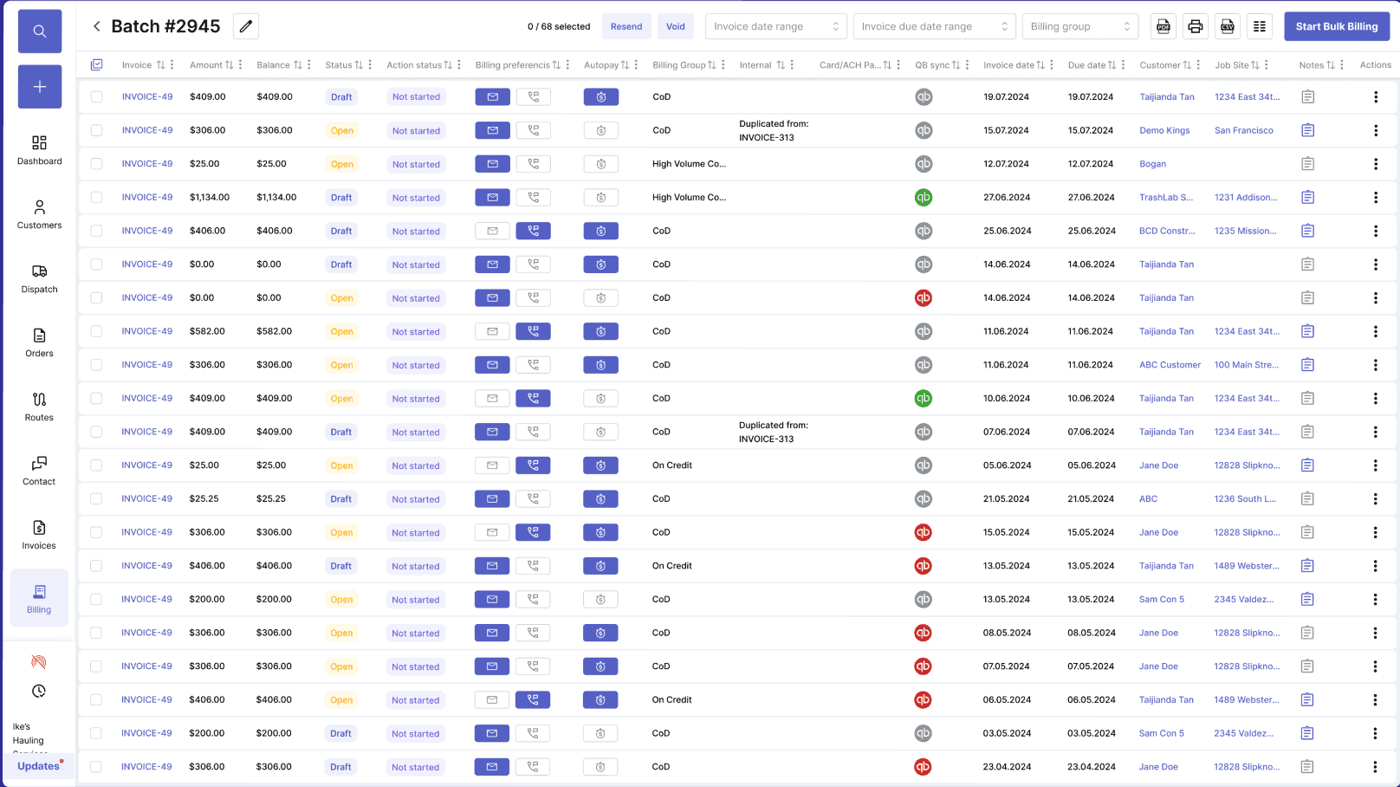
- Batch invoice review with proof attached
- Online payments, auto-pay, statements, and reminders
- QuickBooks-ready sync for accounting reconciliation
Checklist
Billing software checklist for waste haulers
Use this checklist to compare TrashLab against older billing systems and generic accounting add-ons.
Connects scheduled work, completed work, customer account, and invoice lines.
Supports recurring billing and one-off invoices in the same system.
Captures billable exceptions from dispatch and driver proof.
Provides customer portal access for invoices, payments, statements, and history.
Supports AR aging, dunning, credit holds, and account notes.
Syncs to QuickBooks or accounting without manual duplicate entry.
Reports on missed charges, dispute rate, DSO, and route or account profitability.
Scales to high-volume invoice batches without browser-side full-table loads.
Next steps
Related billing resources
Waste billing software
Full billing workflow page for haulers.
Waste hauling invoice template
A free invoice template for hauling work.
Customer portal software
Portal workflows for payments and statements.
Waste management software
The full operating platform across dispatch, billing, and CRM.
Waste dispatch software
Dispatch board, route status, driver app, and same-day changes.
Waste billing software
Recurring billing, exception charges, payments, and AR.
Waste hauler CRM
Customer accounts, service sites, quotes, and communication history.
FAQ
Questions haulers ask
What is billing software for waste haulers?+-
It is software that turns hauling work into invoices, payments, AR records, statements, and accounting handoff. A hauler-specific billing system connects directly to dispatch, driver proof, customer accounts, and route exceptions.
Can TrashLab handle recurring billing?+-
Yes. TrashLab supports recurring billing cycles for residential, commercial, roll-off, and mixed operations, including account-specific pricing and mid-cycle service changes.
Does TrashLab integrate with QuickBooks?+-
Yes. TrashLab syncs clean customer, invoice, payment, and billing records to accounting systems so the office avoids duplicate data entry.
Can drivers create billable proof?+-
Yes. Driver photos, timestamps, exception reasons, and disposal details can flow into invoice review so billing has proof before invoices are sent.
Does billing software help reduce disputes?+-
Yes. When proof of service and exception notes attach to invoice lines, customer service can explain charges quickly and disputes are easier to resolve.
TrashLab
See how the workflow fits your hauling operation
Bring real dispatch, billing, route, driver, and container examples. We will walk through how they work in TrashLab.
Talk to sales: (720) 262-2079