
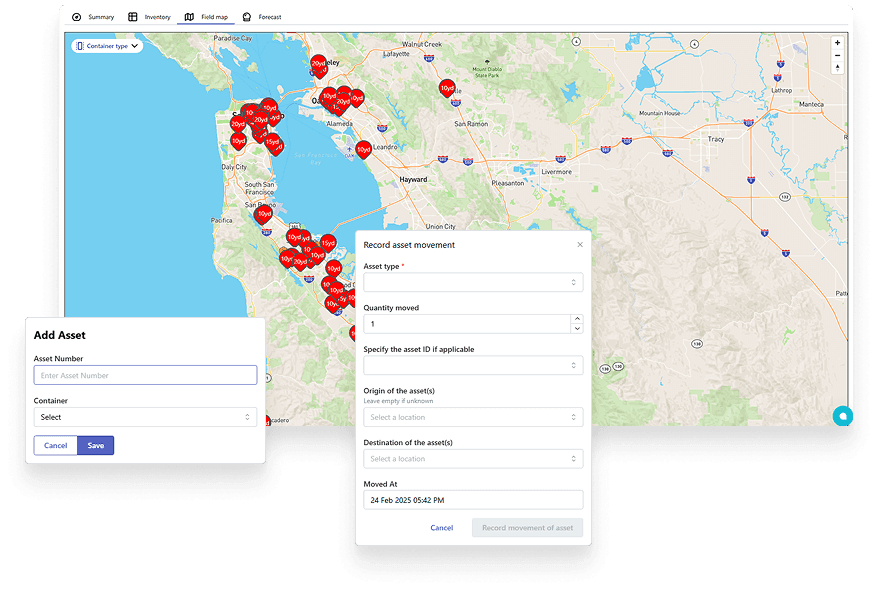
Container tracking software
Container tracking software for dumpsters, yards, and customer sites
Container tracking software treats every dumpster, cart, and roll-off box as a revenue-generating asset — not an inventory row that gets updated once a quarter. TrashLab tracks where each container is, who has it, what status it is in (available, scheduled, on rent, ready for pickup, in maintenance), how long it has been sitting, and whether it is earning. When tracking connects to dispatch, the driver app, and billing, you stop losing containers, stop quoting jobs as 'sold out' when you actually have inventory, stop missing extra-day charges, and stop buying new containers before you have used the ones you already own.
Operating pain
Containers are revenue assets, not static inventory
A 30-yard roll-off box costs thousands of dollars and earns rent every day it is at a customer site. When tracking lags behind reality, that asset sits idle in a yard, gets billed for the wrong number of days, ends up at the wrong customer, or quietly disappears. Multiply that across a fleet of hundreds of containers and the cost of bad tracking is the price of a new truck every year.
Dispatch does not know which containers are available, on rent, in yard, or waiting for service when a customer calls.
Containers sit idle in customer driveways because turns, returns, and holds are invisible.
Extra rental days and asset movement do not always make it into billing.
Customer sites have incomplete container history and unclear service records.
Operators buy more containers before they have utilization data on the ones they already own.
Containers go missing — left at old job sites, taken to wrong yards, or 'borrowed' by competitors — without an audit trail.
Maintenance schedules slip because no one knows which boxes are due for repair or paint.
Customer service quotes availability based on what they think is in the yard, not what is actually there.
What to look for
Container tracking capabilities
Searchers looking for dumpster tracking software want to know that location, status, service history, utilization, and revenue visibility are all handled together — not in five disconnected tools.
Container status workflow
Track whether each container is in yard, scheduled, delivered, on rent, ready for pickup, in transit, unavailable, or in maintenance — with the right next action available from the same screen.
Site and customer history
See which containers were placed at each customer site, how long they were there, what service happened, and what billed events came out of it.
Yard inventory
Know exactly what is in each yard by size, type, and condition. Reserve specific units, flag units for maintenance, and balance inventory between yards.
Dispatch connection
Connect container movement to drops, pickups, swaps, relocations, and returns so the dispatch board and the inventory list stay in sync.
Photo and field proof
Use driver photos, geostamps, and timestamps to document container condition, placement, and service — and reduce placement disputes with customers.
Rental day tracking
Count billable days from drop to pickup automatically, including swaps, holds, and relocations, so extras never go uncharged.
Utilization reporting
Review turns, idle inventory, billed days, dwell time, and availability across the fleet — by container size, yard, and customer segment.
Maintenance and lifecycle
Track repair history, paint cycles, and decommissioning so containers stay safe, presentable, and revenue-generating.
Billing context
Keep rental duration, extra days, swaps, contamination, and service exceptions visible for invoicing and dispute resolution.
Workflow
How container tracking should work
Container tracking earns its keep when every movement updates the operating record automatically — and when that record drives both dispatch and billing.
Assign
Start each job with accurate availability and the right container for the work.
- Check inventory by size, yard, condition, and availability in real time
- Reserve specific containers for upcoming orders
- Assign containers to customer sites with placement instructions
- Keep dispatch aware of asset constraints when scheduling
Move
Update container status as drivers complete drops, swaps, returns, and pickups in the field.
- Record site placement and service proof from the cab
- Update container status from the driver app automatically
- Capture blocked, contaminated, overloaded, or damaged conditions
- Track relocations between sites without losing rental day continuity
Improve utilization
Use history to find idle inventory, faster turns, and the next purchase decision.
- Review billed days versus calendar days per container
- Identify long dwell times, slow returns, and missing units
- Plan fleet purchases with actual utilization data, not guesses
- Spot containers ready for maintenance, repaint, or retirement
Checklist
Container tracking software checklist
Use these requirements when evaluating container or dumpster tracking software so you do not buy a generic tracking table.
Tracks each container by ID, size, status, site, customer, yard, condition, and service history.
Connects container movement directly to dispatch jobs and driver completion.
Captures photos, notes, timestamps, and exception details on every move.
Supports roll-off workflows including drops, pickups, swaps, returns, relocations, and holds.
Reports on idle containers, turns, billed days, dwell time, and fleet utilization.
Links rental duration and service events to billing workflows automatically.
Supports multiple yards, container types, and lines of business on the same instance.
Tracks maintenance, paint cycles, and lifecycle status for each unit.
Provides an audit trail of every status change — who, when, where, why.
Scales to thousands of active containers without lists slowing to a crawl.
Next steps
Related container and roll-off resources
Container utilization calculator
Estimate turns, billed days, and idle fleet cost.
Dumpster rental software
Roll-off software for container-based operations.
Waste dispatch software
Dispatch jobs and container moves from one board.
Waste hauler software
The complete operating system for haulers.
Dumpster rental software
Roll-off workflows for containers, jobs, drivers, and billing.
ROI calculator
Estimate savings from better dispatch, routing, and billing.
FAQ
Questions haulers ask
What is container tracking software?+-
Container tracking software helps haulers track dumpsters, carts, and other waste assets by ID, location, status, customer site, yard, condition, service history, and utilization. The best systems connect tracking to dispatch and billing so every container move updates inventory and triggers the right billing line items.
Is container tracking the same as GPS tracking?+-
Not quite. GPS gives you a location on a map. Operational container tracking also tells you who has the container, what status it is in, how many days it has been on rent, what service has happened, and what should be billed. GPS plus operational tracking is stronger than either alone.
How does container tracking improve revenue?+-
It helps reduce idle assets, improve turns, capture missed extra-day charges, quote availability accurately, and support cleaner billing records. The two biggest revenue gains are usually catching unbilled rental days and avoiding the purchase of new containers when existing inventory is just untracked.
Does TrashLab support roll-off container tracking?+-
Yes. TrashLab supports roll-off workflows including drops, pickups, swaps, relocations, holds, yard returns, proof of service, and billing context — with the right container ID attached at every step.
Can container tracking handle multiple yards?+-
Yes. Inventory by yard, transfers between yards, and cross-yard utilization reporting are all supported. Operators with multiple yards can balance inventory and avoid the situation where one yard is short while another sits on idle units.
What about smaller carts and equipment?+-
Container tracking is not just for 30-yard roll-off boxes. Carts, dumpsters, compactors, totes, and special equipment can all be tracked with the same workflow — by ID, location, status, customer, and service history.
How does container tracking reduce customer disputes?+-
Photos, timestamps, GPS, and structured exception notes attached to each container move give billing and customer service the evidence they need to resolve placement, service, and rental-day disputes quickly. Most disputes evaporate when the customer sees the photo.
Do drivers have to scan barcodes to update container status?+-
Barcode or QR scanning can be used, but it is not required. Container status updates happen as a normal part of the driver app workflow — when the driver completes a drop, swap, or pickup, the container record updates automatically.
TrashLab
See how the workflow fits your hauling operation
Bring real dispatch, billing, route, driver, and container examples. We will walk through how they work in TrashLab.
Talk to sales: (720) 262-2079