
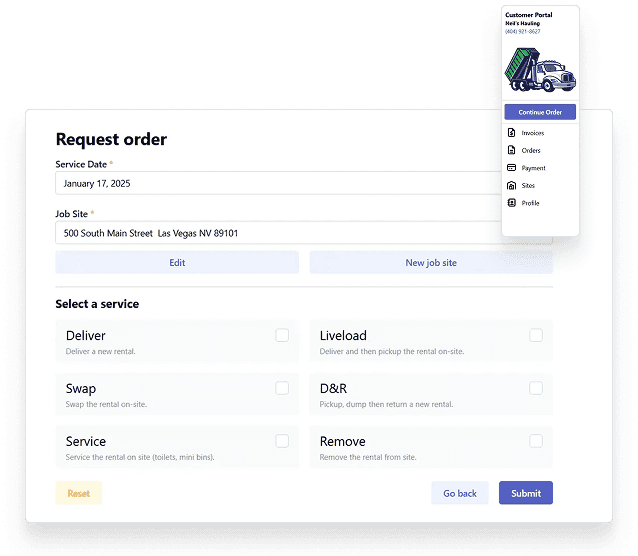
Waste customer portal software
Waste customer portal software that reduces calls without creating office cleanup
A customer portal only helps if it is connected to dispatch, billing, CRM, and service history. TrashLab gives haulers portal workflows for online payments, statements, service requests, order intake, invoice access, service history, and account updates so customers can self-serve while the office keeps one clean operating record.
Operating pain
A disconnected portal just moves work around
Customers want to pay bills, request service, see account history, and get status without waiting on the phone. But if portal requests have to be copied into dispatch or billing manually, the portal becomes another inbox. A useful portal creates structured data that flows into the same operating system your team already uses.
Online payments and statements are separate from customer service and dispatch history.
Service requests arrive as emails that someone has to retype into the dispatch board.
Customers call anyway because portal status does not reflect real route or billing status.
Commercial accounts need multiple contacts, permissions, sites, invoices, and statements.
Residential customers create high call volume for missed pickups and payment questions.
Portal orders can promise service that dispatch capacity or service area cannot support.
What to look for
Customer portal capabilities haulers should expect
Competitors commonly list customer portal as a feature. The differentiator is whether portal activity is connected to CRM, dispatch, billing, and driver proof.
Online payments and statements
Let customers view invoices, download statements, make payments, enroll in auto-pay, and see payment history.
Service requests
Capture missed pickup reports, extra pickups, cart/container requests, swaps, pickups, removals, and support questions as structured requests.
Order intake
Let roll-off and service customers request quotes or orders with service area, pricing, and availability context.
Dispatch status
Expose relevant service status and history without giving customers internal dispatch complexity.
Multi-contact accounts
Support commercial accounts with multiple contacts, service sites, billing permissions, and statement access.
CRM and billing connection
Keep portal requests, payments, invoices, notes, and customer communication attached to the account record.
Workflow
How portal activity should flow
TrashLab treats the portal as an extension of the operating system, not a separate customer-facing widget.
Customer self-service
Give customers a clean way to handle common requests without calling.
- View and pay invoices, statements, and account balances
- Request service, report missed pickups, and update common account details
- Review service history, payment history, and request status
Office workflow
Turn portal activity into structured work for the right team.
- Route service requests to dispatch or customer service
- Attach payments and statements to billing records
- Keep every portal interaction visible in customer history
Operational control
Keep the portal from overpromising or bypassing business rules.
- Respect service area, route capacity, customer status, and pricing rules
- Expose appropriate status without internal-only details
- Report on portal adoption, call deflection, payments, and request types
Checklist
Waste customer portal checklist
Use this checklist to compare portal features in waste hauler software demos.
Supports payments, auto-pay, statements, invoices, payment history, and account balances.
Captures service requests as structured records, not emails to be retyped.
Connects portal requests to dispatch, CRM, billing, and customer service workflows.
Supports residential and commercial permissions, contacts, sites, and billing roles.
Shows appropriate service history and request status to customers.
Respects service area, route capacity, account status, and pricing rules.
Reports on portal adoption, payment volume, call deflection, and request types.
Scales to large account histories with backend filtering and indexed search.
Next steps
Related portal and CRM resources
Waste hauler CRM
Customer account and communication workflows.
Residential waste hauler software
Residential self-service, payments, and missed pickup workflows.
Commercial waste hauler software
Commercial account, site, and billing portal workflows.
Waste management software
The full operating platform across dispatch, billing, and CRM.
Waste dispatch software
Dispatch board, route status, driver app, and same-day changes.
Waste billing software
Recurring billing, exception charges, payments, and AR.
Waste hauler CRM
Customer accounts, service sites, quotes, and communication history.
FAQ
Questions haulers ask
What is waste customer portal software?+-
It is customer-facing software that lets waste hauler customers view invoices, make payments, request service, see history, and manage common account workflows online. The best portals connect directly to dispatch, billing, CRM, and customer service.
Can a customer portal reduce phone calls?+-
Yes. Payments, statements, missed pickup reports, service requests, and account history are common reasons customers call. A connected portal lets customers self-serve those tasks and lets the office focus on exceptions.
Does TrashLab support commercial portal permissions?+-
Yes. Commercial customers can have multiple contacts, service sites, billing access, and account-level workflows rather than one shared login with no structure.
Can portal requests become dispatch work?+-
Yes. Portal requests can become dispatchable service work or customer service follow-up without someone copying details into another system.
Can customers pay online?+-
Yes. Portal workflows can support online invoice payments, statements, payment history, and auto-pay enrollment.
TrashLab
See how the workflow fits your hauling operation
Bring real dispatch, billing, route, driver, and container examples. We will walk through how they work in TrashLab.
Talk to sales: (720) 262-2079