
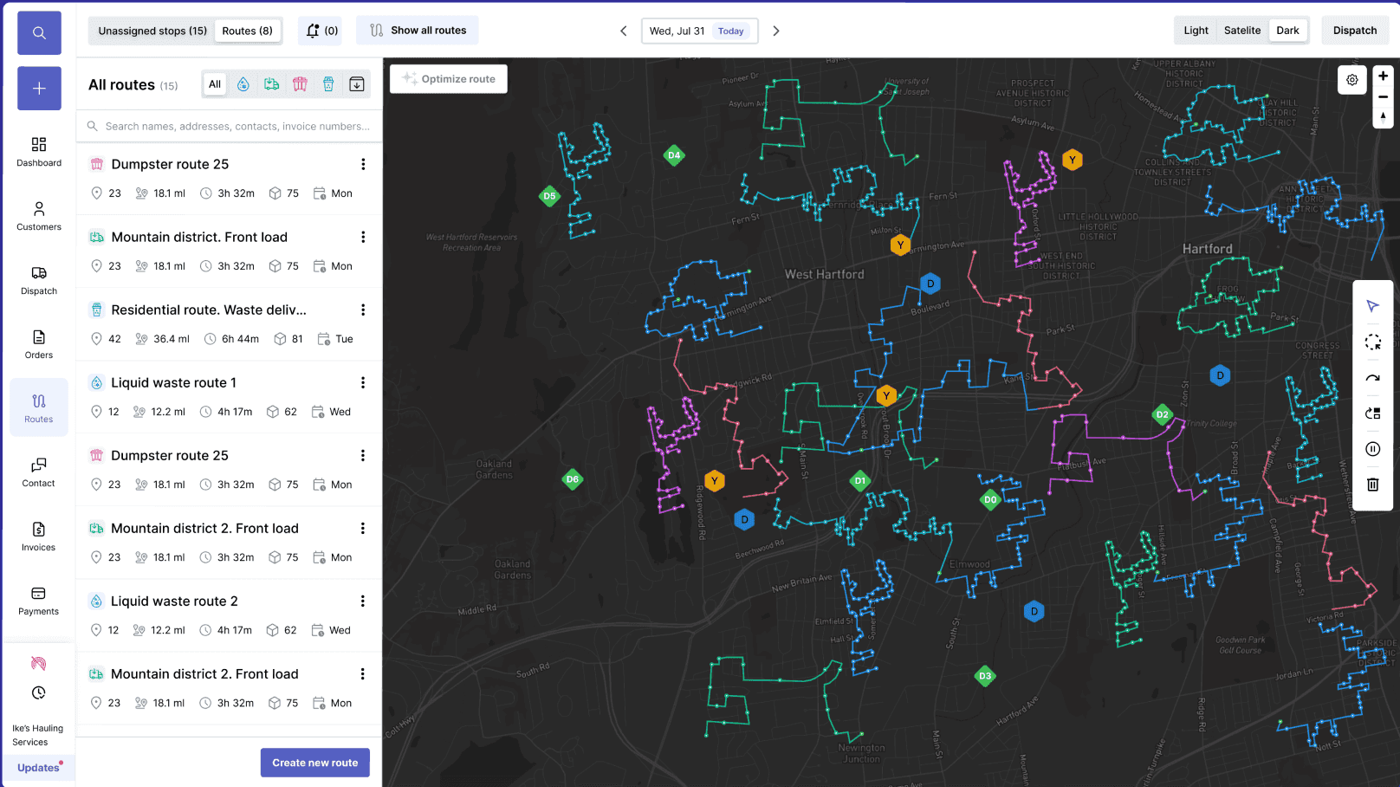
Waste route optimization software
Automated waste route optimization for haulers
Automated waste route optimization earns its keep when planning, execution, and billing all happen in the same system. Most routing tools stop at the optimal stop sequence; haulers also need automated trash route scheduling that survives contact with reality — service windows that move, drivers who know shortcuts, customers who cancel, disposal sites that close early, loads that run heavy, and same-day swaps that show up at 10 AM. TrashLab plans daily routes around real operating constraints, pushes them to drivers, tracks live progress and exceptions, and feeds completed work back into billing so automation actually reduces miles, overtime, and missed pickups.
Operating pain
Routes are expensive when planning and execution are split
Waste route optimization is more than finding a shorter path between stops. Haulers need routing that respects service windows, truck capacity, driver knowledge, customer priority, disposal-site timing, and field exceptions — and that connects to dispatch and billing so today's actual outcomes inform tomorrow's plan. When routing is a separate tool that exports a PDF, none of that happens.
Routes are planned manually and adjusted by habit rather than current data.
Dispatch cannot see route progress without calling drivers in the cab.
Missed pickups and blocked containers become customer service problems before managers even know.
Routes are optimized in one tool, but billing and reporting happen somewhere else, so the savings are invisible.
Managers cannot easily compare planned route performance to actual route outcomes.
Static routes do not reflect new accounts, dropped accounts, or changes in service frequency.
Drivers ignore the routing tool because the suggested order does not match site conditions.
Fuel, overtime, and disposal costs creep up quarter over quarter without anyone seeing why.
What to look for
Route optimization capabilities
Search intent around automated trash route scheduling usually includes planning, dispatch, field visibility, missed pickup reduction, and measurable cost reduction. These are the capabilities that turn a routing tool into actual operating savings.
Automated trash route scheduling
Build daily routes using service type, stop density, geography, equipment, capacity, time windows, and operating constraints — not just the shortest distance.
Recurring route templates
Run weekly residential and commercial routes from templates that adapt to new accounts, dropped accounts, and frequency changes automatically.
Dynamic re-routing
Adjust mid-day when a truck breaks down, a load goes heavy, a customer cancels, or a disposal site closes early — without manually rebuilding the rest of the route.
Driver route execution
Push stop order, instructions, navigation context, and status workflows to drivers — with the route adapting to in-cab updates.
Missed pickup reduction
Track route completion, late stops, blocked service, and missed pickups in real time so dispatch and customer service can react before customers call.
Exception handling
Capture photos, notes, and structured reasons when a stop cannot be completed as planned — and feed them to billing and reporting.
Route profitability
Connect each route to revenue, hours, fuel, disposal, labor, and service outcomes so you can see margin per route and per stop, not just miles.
Plan vs actual reporting
Compare planned routes against what really happened — stops completed, deviations, late arrivals, and exceptions — so tomorrow's plan is better than today's.
Capacity and yard balancing
Balance routes across trucks, yards, and shifts to avoid overtime spikes and underused equipment.
Automation outcomes
Where automated route optimization pays back
The best route automation does not just shorten a map line. It improves the dispatch decisions, field execution, and closeout records that decide whether the day was profitable.
Automated trash route scheduling
Plan recurring and same-day work from live route, driver, truck, service-window, and customer data instead of rebuilding the board by hand.
Daily route optimization
Rebalance each service day around new orders, cancellations, heavy loads, disposal timing, and driver capacity before costs pile up.
Missed pickup reduction
Surface blocked access, late routes, skipped stops, and at-risk service while dispatch still has time to reroute or notify the customer.
Dispatch-to-billing closeout
Carry completed stops, exceptions, photos, and disposal notes into invoice review so route automation also protects revenue.
Workflow
How route optimization should fit the operation
The strongest automated waste route optimization workflow connects planning, dispatch, execution, and closeout. None of these steps work in isolation — and skipping any of them is where savings disappear.
Plan
Create practical routes using the real operating constraints of the day, not yesterday's assumptions.
- Group stops by geography, service type, and frequency
- Account for driver, truck, yard, and disposal-site constraints
- Balance route density against customer service windows
- Apply route templates for recurring residential and commercial work
Execute
Give drivers enough detail to complete the route without repeated office calls — and let the route adapt mid-day.
- Send route order and stop instructions to the driver app
- Capture status, notes, photos, and proof of service per stop
- Handle missed pickups, blocked containers, and access issues quickly
- Reroute or reassign when a truck breaks down or a customer cancels
Improve
Use route history to make tomorrow's plan better than today's — and to find margin you did not know you were leaving on the table.
- Compare planned work with completed work, route by route
- Identify costly stops, account issues, and route imbalance
- Measure margin per route, per driver, and per service type
- Roll insights into route templates, pricing, and capacity decisions
Checklist
Route optimization buying checklist
Route optimization should improve both planning and operating visibility — not produce a one-time PDF that drivers ignore.
Supports waste collection, roll-off, residential, commercial, recycling, and recurring route patterns.
Shows planned and actual route status in the same system as dispatch.
Captures driver proof of service, exception notes, timestamps, and photos.
Connects route outcomes to billing, customer service, and management reporting.
Helps evaluate route profitability and margin per stop, not just distance traveled.
Adapts mid-day to truck breakdowns, customer cancellations, and disposal-site changes.
Scales beyond small route boards without loading full data sets into the browser.
Provides plan vs actual reporting so route templates improve over time.
Respects driver knowledge and lets dispatchers override the algorithm when site conditions demand it.
Integrates with truck telematics and GPS for accurate ETAs and fuel reporting.
Next steps
Related routing resources
Garbage route planner
Existing route-planning page and route optimization overview.
Route profitability calculator
Estimate contribution and route economics.
Waste dispatch software
Dispatch workflows that feed and adjust routes.
Waste hauler software
The complete operating system for haulers.
Dumpster rental software
Roll-off workflows for containers, jobs, drivers, and billing.
ROI calculator
Estimate savings from better dispatch, routing, and billing.
FAQ
Questions haulers ask
What is waste route optimization software?+-
Waste route optimization software helps haulers plan efficient routes, assign them to drivers, track route progress in real time, reduce avoidable miles and overtime, and improve service execution. The best systems connect planning to dispatch, the driver app, billing, and reporting so that route optimization is part of the operation, not a separate tool.
Does route optimization only matter for residential routes?+-
No. Route optimization is useful for residential, commercial, roll-off, recycling, portable toilet, and any other route-based hauling workflow. Roll-off in particular benefits from dynamic routing because the day's stops are rarely fixed in advance.
How does route optimization connect to billing?+-
Completed stops, failed-service events, extra trips, disposal tickets, contamination flags, and driver notes all affect billing. When route execution feeds the same system as billing, those events become line items automatically — instead of getting missed or chased down at month end.
What should route optimization software track?+-
It should track planned stops, completed stops, route status, ETAs, driver updates, service exceptions, photos, timestamps, customer context, and route performance — and report on plan vs actual so the next route is better than the last.
Can route optimization handle same-day changes?+-
It should. A route plan that cannot adapt to a truck breakdown, a customer cancellation, or a disposal-site closure is not really an optimization tool — it is a static report. TrashLab supports dynamic re-routing and pushes changes to drivers in the cab.
How much can route optimization save?+-
Savings depend on route density, current process, and how much waste is in your existing routes. Haulers commonly see meaningful reductions in miles, overtime, and missed pickups after rollout — try the route profitability calculator to estimate the size of the prize for your specific operation.
Do drivers actually follow optimized routes?+-
They do when the routing respects driver knowledge and site conditions. Routes that ignore left-turn bans, narrow alleys, or cul-de-sac order get ignored. Good route optimization software lets dispatchers tweak the algorithm with field knowledge and lets drivers flag stops that should be re-sequenced.
Does route optimization replace GPS?+-
No. GPS tells you where the truck is. Route optimization tells you where the truck should go next, why, and what to do at each stop. The two work better together — but route optimization is what changes the cost structure.
TrashLab
See how the workflow fits your hauling operation
Bring real dispatch, billing, route, driver, and container examples. We will walk through how they work in TrashLab.
Talk to sales: (720) 262-2079