
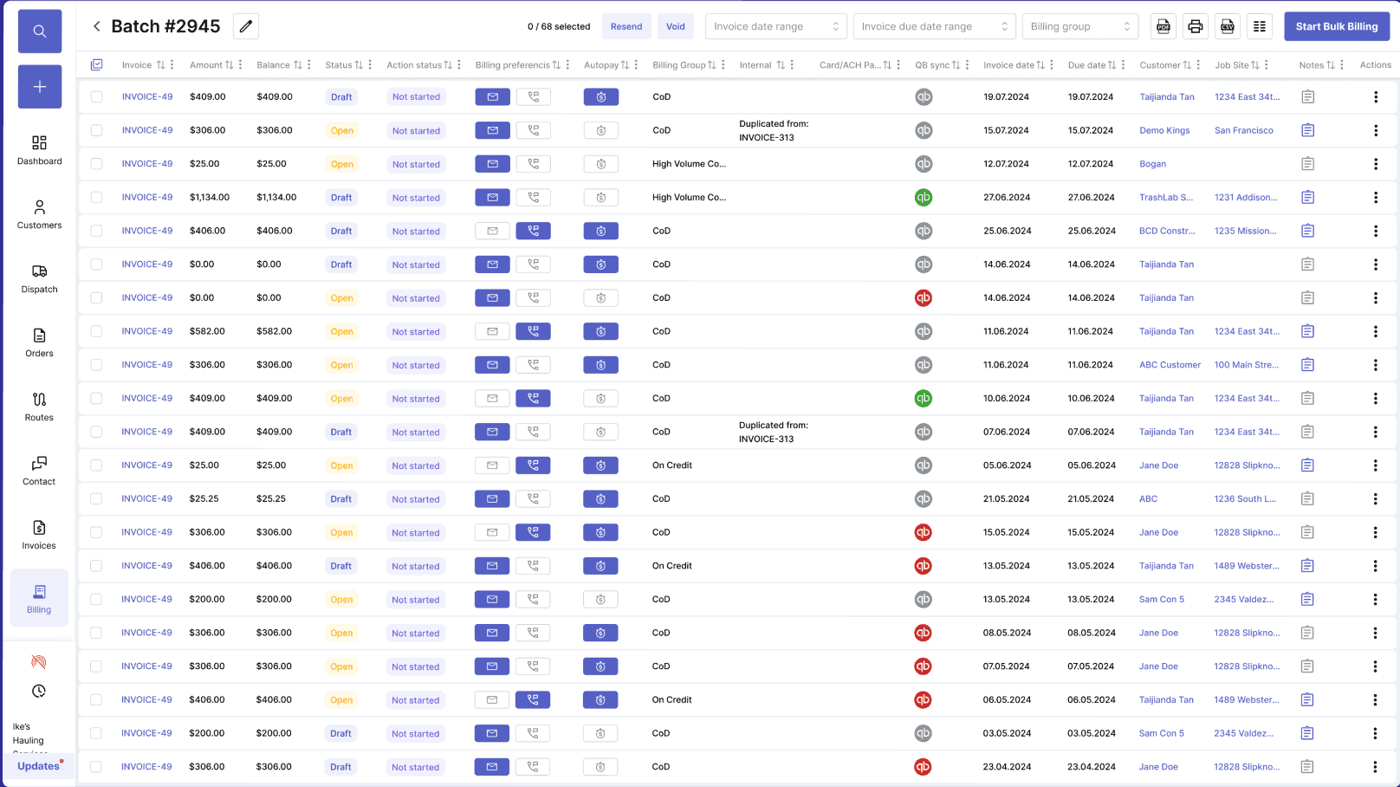
Feature checklist
Waste billing software features haulers should require
Waste billing software does more than print invoices. The features that move the AR needle are the ones that capture billable events while the work is happening, surface revenue leakage before it becomes a write-off, automate the boring parts of recurring billing, give customers a portal that takes phone calls off your team, and hand clean data to accounting without duplicate entry. This guide breaks down the specific features to require — and why each one matters in dollars — when evaluating waste management billing software for your operation.
Operating pain
Billing features should match how haulers make money
Hauling revenue is created across service events, route work, container movement, disposal, and account-specific rules. Billing software has to capture those events as line items — automatically — instead of forcing teams into a manual reconciliation marathon at month end. Every feature below should be evaluated against a real revenue leak it would close or a real cycle it would shorten.
Recurring service changes (frequency, price, container size) miss the next billing cycle.
Extras and field exceptions are not reviewed before invoices go out, then disputes pile up after.
Customer disputes drag on because the proof of service is disconnected from the invoice line.
Payment status, account notes, and invoice history live in three different systems.
Reports show total revenue but not where charges are missed, written off, or never billed.
Statements go to the wrong contact, so payment reminders never reach the person who can pay.
Accounting re-enters work into QuickBooks because operations and the books run on different records.
Manual end-of-month batches generate errors that customers catch first.
What to look for
Must-have billing features
Use these feature groups to evaluate whether billing workflows actually match real hauling operations — and to catch vendors who claim 'recurring billing' but mean 'a list of customers and a checkbox'.
Recurring billing cycles
Weekly, monthly, quarterly, and custom cycles for residential, commercial, and municipal accounts — with mid-cycle changes that flow automatically into the next invoice.
One-off and project billing
Bill temporary jobs, roll-off rentals, demolition projects, special pickups, and ad hoc service alongside recurring revenue.
Billable exceptions
Capture overages, contamination, failed service, extra rental days, relocation, blocked access, and disposal-related fees with photo proof attached.
Invoice review queue
Audit completed work, exceptions, proof of service, and customer rules before invoices are sent — instead of fielding disputes after the fact.
Customer portal and online payments
Let customers view statements, set up auto-pay, request service, and pay by ACH or card without picking up the phone.
AR aging and collections
Aging buckets, automated statements, dunning reminders, payment plans, and credit holds — without manual cleanup.
Tax, surcharges, and contract pricing
Handle sales tax, fuel surcharges, environmental fees, contract rates, and price escalators automatically.
Revenue leakage reporting
See unbilled days, missed extras, write-offs, and dispute rates by route, driver, account, and container — so leaks get closed instead of hidden.
Accounting sync
Push invoices, payments, credits, and customers to QuickBooks Online, QuickBooks Desktop, or another accounting system without duplicate entry or end-of-month catch-up.
Workflow
Billing feature workflow
The strongest billing systems build invoices from source events instead of from manual reconstruction at month end.
Capture
Collect billable details as service work happens — not three days later from a route sheet.
- Completed jobs, route events, and service status
- Driver notes, photos, and timestamps per stop
- Container movement (drops, swaps, pickups, relocations)
- Disposal tickets, weights, and contamination flags
Review
Audit what is ready to bill before invoices reach customers.
- Recurring account changes that affect the next cycle
- Extras and exceptions with proof attached
- Customer- and site-specific billing rules
- Tax, surcharges, and contract terms applied correctly
Improve
Use billing history to find missed margin, faster cycles, and stronger customer relationships.
- AR aging trends, payment behavior, and collection effectiveness
- Missed charges, dispute rates, and write-off causes
- Route, account, and container profitability signals
- Contract renewal and price escalation timing
Checklist
Billing feature checklist
Use this as the feature checklist for any waste billing software evaluation — and require a live demo on each line item.
Recurring billing cycles with mid-cycle changes, account rules, and multi-site customers.
One-time invoices for roll-off, special pickups, and temporary jobs.
Extras including extra days, overages, contamination, relocation, blocked service, and disposal.
Proof of service and driver notes visible during invoice review.
Payment tracking with online payments, auto-pay, ACH, and credit card.
AR aging, automated statements, dunning, payment plans, and credit holds.
Tax handling, fuel surcharges, environmental fees, and contract pricing rules.
Reports for missed charges, disputes, billing-cycle speed, route revenue, and account profitability.
QuickBooks (or accounting system) sync without duplicate entry.
Audit trail of who voided, credited, or adjusted any invoice.
Next steps
Related billing resources
Waste billing software
TrashLab billing software page.
Waste hauling invoice template
Create cleaner invoices for hauling work.
ROI calculator
Estimate savings from automation and billing accuracy.
Waste hauler software
The complete operating system for haulers.
Dumpster rental software
Roll-off workflows for containers, jobs, drivers, and billing.
ROI calculator
Estimate savings from better dispatch, routing, and billing.
FAQ
Questions haulers ask
What are the most important waste billing software features?+-
The features that move the most dollars are recurring billing with mid-cycle changes, billable exceptions with proof of service attached, one-off invoicing, online payments, AR aging and dunning, accounting integration, and revenue leakage reporting. Each one closes a specific gap between service done and cash in the bank.
Should billing software include proof of service?+-
Yes — and it should attach to the invoice line, not live in a separate folder. Proof of service validates exception charges, reduces disputes, and gives customer service the evidence to defend a charge in 30 seconds instead of 30 minutes.
What billable exceptions should haulers track?+-
Common exceptions include overages, extra rental days, contamination, blocked access, relocation, failed service, extra pickups, overweight loads, and disposal-related fees. Each should be captured in the field by drivers and reviewed by billing before invoices go out.
How does billing software improve cash flow?+-
It helps send invoices faster, reduces missed charges, automates payment reminders, supports online payments and auto-pay, and shortens dispute resolution. The compounding effect is shorter DSO, less write-off, and more revenue retained from work already done.
Does billing software replace QuickBooks?+-
No. Operating billing software handles the workflow that creates invoices and takes payments — recurring cycles, exceptions, customer portal — and syncs clean records to QuickBooks for the books, taxes, and accounting reporting. The two systems complement each other.
Can the customer portal handle auto-pay?+-
Yes. Customers can enroll in auto-pay (ACH or card), set up payment methods, view statements, and pay manually if they prefer. Auto-pay enrollment alone tends to shorten DSO meaningfully.
How does revenue leakage reporting work?+-
Revenue leakage reports compare what was scheduled and completed against what was billed — by route, driver, customer, and container — so unbilled days, missed extras, and write-off patterns become visible. The first time most haulers run this report, they find more leak than they expected.
Are taxes and fees handled automatically?+-
Yes. Sales tax, fuel surcharges, environmental fees, and contract-specific pricing rules apply automatically per customer and per service type. Annual price escalations and contract renewals can be scheduled in advance so they trigger without anyone remembering.
TrashLab
See how the workflow fits your hauling operation
Bring real dispatch, billing, route, driver, and container examples. We will walk through how they work in TrashLab.
Talk to sales: (720) 262-2079