
Waste management driver app
Waste management driver app for field work and proof of service
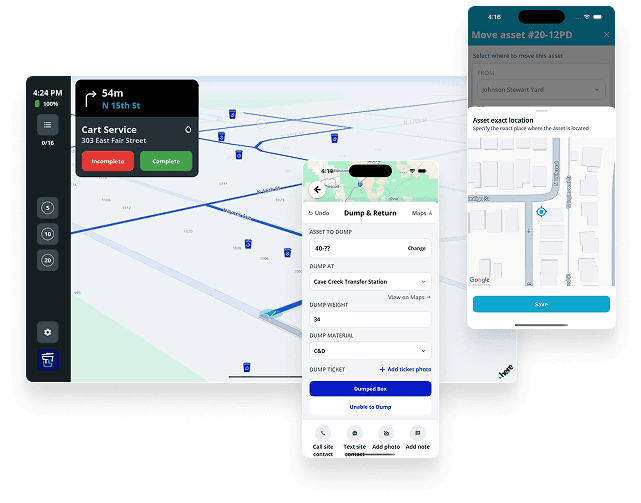
The driver app is where the truth of the operation actually gets created. If field updates live in texts, calls, paper sheets, or memory, every other team — dispatch, customer service, billing, and management — spends the day reconstructing what happened. TrashLab gives drivers a fast, low-tap, offline-friendly app that shows the route, the stop sequence, the site instructions, the customer context, and the container ID — and lets them capture photos, signatures, timestamps, exception reasons, and proof of service with a few taps. The same updates flow back to dispatch in real time, give customer service answers without a phone call, and feed billing the line items it needs to invoice cleanly.
Operating pain
Driver work is where operating truth is created
If the proof of what happened on a route lives in someone's phone, in a memory, or on a paper sheet that gets dropped in a tray at end of day, the office spends the next 48 hours rebuilding the day instead of running the next one. Every disconnected text and missed photo costs billing accuracy, customer service speed, and dispatch trust.
Drivers receive incomplete instructions or out-of-date route updates that do not reflect same-day changes.
Dispatch cannot see route progress without interrupting drivers in the cab.
Customer service cannot answer 'is my pickup done?' without calling dispatch.
Billing cannot prove extra charges, failed service, or disputed work because the photo lives in a text thread.
Managers lack structured data about exceptions — every issue is a one-off, not a pattern.
Drivers waste time on apps that take too many taps or that drop their work when signal is weak.
Paper route sheets pile up and never get reconciled against the schedule.
New drivers ramp slowly because the routes, the customers, and the exception process all live in tribal knowledge.
What to look for
Driver app capabilities
Driver app searches consistently include proof of service, driver tracking, field notes, photos, navigation, and route status. These have to be fast, low-tap, and connected back to dispatch and billing.
Route and stop details
Show drivers the day's route order, service type, customer, site, container ID, and any special instructions in a clear, low-tap interface.
Proof of service capture
Photos, timestamps, GPS, signatures, and completion status — captured per stop with a few taps and tied automatically to the right job and container.
Exception reporting
Structured workflows for blocked containers, contamination, overweight loads, access issues, and failed-service reasons — so billing and reporting actually get usable data.
Offline-friendly operation
Keep the route running when signal drops in basements, rural areas, or transfer-station tunnels. Updates sync automatically when the connection comes back.
Dispatch communication
Receive same-day route changes from dispatch and send status back without phone calls or texts.
Navigation and ETAs
Turn-by-turn navigation, optimized stop order, and ETAs that update as the day progresses — visible to customer service in real time.
Container workflow
Drops, swaps, pickups, relocations, and holds with the right container ID attached automatically — no free-text guessing.
Customer communication support
Trigger arrival texts, completion notifications, and signature requests so customers get updates without dispatch picking up the phone.
Billing handoff
Convert field records into invoice line items for extras, failed service, rental days, and disposal events — automatically.
Workflow
Driver app workflows
The driver app should support drivers without creating extra administrative work. Every additional tap is a tap drivers will skip, which means data the office will not get.
Before the route
Drivers start the day with clear work and fewer ambiguous handoffs.
- View the assigned route and stop order in the right sequence
- Read customer, site, and container instructions on each stop
- Confirm equipment, container size, and service expectations
- See the latest dispatch updates and same-day changes
During service
Field updates create structured operating records — not text threads to reconstruct later.
- Mark stops complete, blocked, or skipped with a structured reason
- Capture photos, signatures, notes, and timestamps in a few taps
- Report service exceptions with the right billable detail attached
- Update container status (drop, swap, pickup, relocation) from the cab
After the route
Dispatch, customer service, and billing all use the same service record without rework.
- Review completed and missed stops on the dispatch board
- Support customer questions with the original photo and field note
- Move billable events into billing review automatically
- Roll exception patterns into route and account improvements
Checklist
Waste driver app checklist
Evaluate driver apps around two things: how fast they are for drivers, and how clean the data is for the back office.
Shows routes, stops, service type, site instructions, customer context, and container ID.
Captures proof of service with photos, signatures, timestamps, GPS, and status.
Supports failed-service and exception workflows with structured reasons.
Works offline and syncs automatically when the signal returns.
Feeds dispatch, customer service, and billing without duplicate entry.
Works for roll-off, recurring collection, portable toilet, recycling, and other field workflows.
Produces structured records for reporting, not free-text notes.
Runs on iOS and Android tablets and phones drivers already use.
Pushes same-day route changes to drivers without restarting the app.
Has a low-tap interface drivers will actually use without complaint.
Next steps
Related driver workflow pages
Waste dispatch software
Dispatch workflows connected to driver updates.
Waste route optimization software
Route planning and field execution.
Proof and billing workflows
Turn field proof into cleaner invoice records.
Waste hauler software
The complete operating system for haulers.
Dumpster rental software
Roll-off workflows for containers, jobs, drivers, and billing.
ROI calculator
Estimate savings from better dispatch, routing, and billing.
FAQ
Questions haulers ask
What is a waste management driver app?+-
A waste management driver app is the mobile tool drivers use in the cab to receive their route, view stop instructions, navigate, capture proof of service (photos, timestamps, signatures), report exceptions, and update container status. It connects field work to dispatch, billing, and customer service so the back office does not have to reconstruct the day later.
Why does proof of service matter?+-
Proof of service helps resolve customer disputes, validate completed work, document exceptions, and support accurate billing. When a customer claims service did not happen — or that contamination was not their fault — a timestamped photo with GPS resolves the conversation in seconds.
Does the driver app help dispatch?+-
Yes. Driver status updates flow back to the dispatch board in real time, so dispatchers see what is completed, in progress, blocked, or delayed without making phone calls. Customer service can answer status questions without interrupting dispatch.
Can driver notes affect billing?+-
Yes. Driver notes, photos, and exception reasons document overages, contamination, extra work, access issues, failed service, and other billable conditions — and feed those line items directly to billing review without manual re-entry.
Does the driver app work offline?+-
Yes. The app keeps working when signal drops in basements, rural areas, or transfer stations, and syncs updates automatically when connectivity returns. Drivers do not lose work and dispatch does not lose visibility.
What devices does the driver app run on?+-
It runs on iOS and Android tablets and phones — typically the rugged tablets or smartphones drivers already use in the cab. There is no specialized hardware required.
How long does it take drivers to learn the app?+-
Most drivers are productive within their first day. The interface is intentionally low-tap, with the most common workflows (complete a stop, take a photo, report a blocked container) front and center. Veteran drivers tend to adopt it fastest because it eliminates paperwork they did not enjoy in the first place.
Can the driver app trigger customer notifications?+-
Yes. Arrival texts, completion notifications, and signature requests can fire automatically as the driver progresses through the route — so customers get updates without dispatch having to make calls.
TrashLab
See how the workflow fits your hauling operation
Bring real dispatch, billing, route, driver, and container examples. We will walk through how they work in TrashLab.
Talk to sales: (720) 262-2079