
Waste hauler CRM software
Waste hauler CRM software connected to dispatch and billing
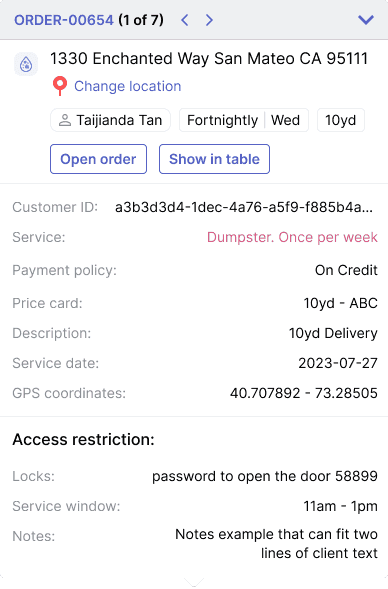
Waste hauler CRM software should do more than store names and phone numbers. Haulers need customer accounts tied to service locations, containers, routes, quotes, billing rules, portal access, call history, text threads, driver photos, and every exception that affects service. TrashLab keeps customer, site, service, dispatch, and billing context in one operating record so your team can answer questions quickly, quote accurately, route new service correctly, and turn completed work into clean invoices without duplicate entry.
Operating pain
Generic CRMs miss the details haulers run on
A generic CRM can tell you who the customer is. It usually cannot tell you which container is on their site, what the driver photographed yesterday, whether their account is on credit hold, which route services them, what billing rule applies, or why the last pickup failed. When those details live outside the customer record, customer service interrupts dispatch, billing misses context, and new orders get booked with bad assumptions.
Customer service cannot see live route status, proof of service, or site instructions without calling dispatch.
Commercial customers have multiple contacts, billing addresses, service addresses, containers, and contract rules scattered across tools.
Quotes get created before the team checks container availability, route capacity, disposal requirements, or customer history.
Calls and texts are disconnected from the job, route, invoice, or service exception they are about.
Billing disputes take too long because account history, driver proof, and invoice records are split across systems.
Sales and service teams cannot see customer profitability, recurring revenue, quote conversion, or churn risk in one view.
Customer portals create more office work when they are not tied directly to dispatch and billing.
Search slows down as customer, job, invoice, and container history grows because the CRM was not built for hauler-scale records.
What to look for
CRM capabilities waste haulers should expect
Searchers using CRM language are usually trying to fix customer service speed, sales follow-up, account history, and the handoff between front office, dispatch, and billing. A hauler-grade CRM has to cover all of that without becoming a disconnected address book.
Customer and site records
Track parent accounts, contacts, billing addresses, service addresses, site notes, gate codes, recurring service, container IDs, and contract terms in one searchable record.
Call, text, and email context
Keep communication history attached to the right customer, site, job, invoice, or service request so the next person who answers the phone has the full story.
Quote and order intake
Turn a call, form fill, or portal request into a quote or order with customer history, route capacity, container availability, and pricing context visible.
Customer service visibility
Give CSRs live dispatch status, ETAs, driver photos, proof of service, and exception notes so they can answer customers without interrupting the dispatcher.
Customer portal
Let customers request service, view invoices, pay bills, download statements, and check service history from a portal tied to the same operating record.
Billing and AR context
Show open invoices, payment status, credit holds, disputes, account rules, and recurring billing settings next to the service history that caused them.
Sales follow-up
Track leads, quote conversion, follow-up tasks, lost reasons, and revenue opportunities without separating sales work from operating reality.
Multi-line account support
Support roll-off, frontload, rearload, residential, commercial, portable toilet, and scale-related customers on the same account when haulers run multiple lines of business.
Reporting and search at scale
Search and filter large customer, site, job, invoice, and communication histories with backend filtering and indexed fields instead of full-table browser loads.
Workflow
How CRM should connect the hauling workflow
The best CRM workflow is not separate from operations. It starts at the first call and carries the same structured record through dispatch, field service, billing, payment, and retention.
Acquire and quote
Use customer context to quote faster without promising service the operation cannot support.
- Capture leads from calls, forms, web orders, and referrals
- Check account history, service area, route capacity, and container availability
- Apply pricing rules, disposal assumptions, contract terms, and taxes
- Schedule follow-up tasks and measure quote conversion by source
Serve and communicate
Keep customer-facing teams aligned with what dispatch and drivers know.
- Attach calls, texts, notes, and requests to the right customer and site
- Expose route status, ETAs, driver photos, and service exceptions to CSRs
- Route new work to dispatch without retyping the customer record
- Send customer updates when service is scheduled, completed, blocked, or delayed
Bill and retain
Use account history to resolve disputes, collect faster, and spot accounts that need attention.
- Review invoices with account rules, proof, and communication history attached
- Let customers self-serve payments, statements, and common requests
- Track churn risk, unresolved complaints, overdue balances, and lost quotes
- Report on customer profitability, AR, and service quality by segment
Checklist
Waste hauler CRM buying checklist
Use these requirements to test whether a CRM is truly built for haulers or just relabeled field-service software.
Supports accounts with multiple contacts, billing addresses, service addresses, sites, and containers.
Connects customer records to dispatch, driver proof, billing, payments, and customer portal workflows.
Stores calls, texts, emails, notes, service requests, quotes, complaints, and follow-up tasks in context.
Shows live route status and service history so customer service can answer questions without interrupting dispatch.
Handles recurring service, one-off jobs, roll-off rentals, commercial contracts, and residential accounts on one record.
Tracks quote conversion, lost reasons, customer profitability, AR status, and retention signals.
Supports permissioned views for sales, customer service, dispatch, billing, managers, and owners.
Indexes common customer, site, invoice, job, and container searches so large histories remain fast.
Includes audit trails for pricing, account status, service changes, and billing changes.
Offers customer portal workflows for ordering, statements, payments, service requests, and account history.
Next steps
Related CRM and operations resources
Waste dispatch software
Connect customer requests to the daily dispatch board.
Waste billing software
Turn customer history and completed work into clean invoices.
Waste management software
The full operating platform behind CRM, dispatch, and billing.
How to choose waste management software
A buyer guide for evaluating workflow fit and implementation.
Waste hauler software requirements checklist
Build an internal scorecard for software demos.
ROI calculator
Estimate savings from better front-office and field workflows.
FAQ
Questions haulers ask
What is waste hauler CRM software?+-
Waste hauler CRM software helps hauling companies manage customer accounts, contacts, service sites, communication history, quotes, service requests, customer portal activity, billing context, and account follow-up. A hauler-grade CRM connects that information to dispatch, the driver app, billing, payments, and reporting instead of acting like a standalone contact list.
How is a waste management CRM different from a generic CRM?+-
Generic CRMs usually focus on sales contacts and pipeline stages. Waste haulers need customer records tied to containers, service addresses, recurring routes, dispatch status, driver proof, billing rules, invoices, payments, complaints, and portal requests. Those details have to be structured data, not notes.
Can a CRM help customer service answer pickup questions?+-
Yes. When route status, ETAs, driver photos, exception notes, and service history are visible from the customer record, CSRs can answer most questions without interrupting dispatch or calling the driver.
Does TrashLab support customer portals?+-
Yes. TrashLab supports customer portal workflows for ordering, service requests, statements, payments, invoice access, and account history. The portal connects to the same operating system as dispatch and billing.
Can TrashLab handle multi-site commercial customers?+-
Yes. TrashLab supports parent accounts with multiple service sites, contacts, billing addresses, service instructions, contract terms, pricing rules, and service histories.
Does CRM data connect to billing?+-
Yes. Customer account rules, service history, proof of service, disputes, payment status, and billing preferences all connect to the billing workflow so invoices are cleaner and disputes are easier to resolve.
Can TrashLab track leads and quote conversion?+-
Yes. TrashLab can track inbound requests, quote history, follow-up tasks, won and lost reasons, and conversion by source so owners can see which channels and customers are turning into revenue.
Is waste hauler CRM useful for small operators?+-
Yes. Small haulers often feel CRM pain earlier because the same few people handle sales, dispatch, customer service, and billing. A connected CRM keeps context in the system instead of in one person's memory.
TrashLab
See how the workflow fits your hauling operation
Bring real dispatch, billing, route, driver, and container examples. We will walk through how they work in TrashLab.
Talk to sales: (720) 262-2079