
Waste management CRM software
Waste management CRM software connected to service, dispatch, and billing
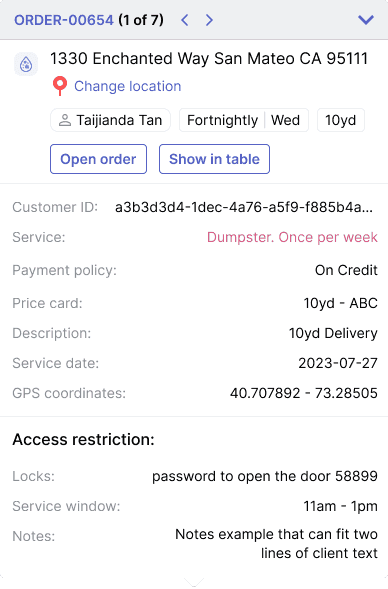
Waste management CRM software should help the office answer customer questions without interrupting dispatch or rebuilding context from notes. TrashLab connects customer accounts, service sites, calls, texts, quotes, portal requests, route status, driver proof, invoices, payments, and reporting so customer-facing teams can move quickly without separating CRM from operations.
Operating pain
Waste customer service breaks when CRM is just an address book
Customers call about pickups, invoices, portals, missed service, quotes, container locations, and account changes. A generic CRM may store the contact, but it usually cannot show what dispatch planned, what the driver photographed, what billing sent, or what the portal request changed.
CSRs cannot see route status, proof, invoice context, or site notes from one screen.
Commercial accounts have contacts, service sites, billing rules, and notes spread across tools.
Quote follow-up is disconnected from route capacity, customer history, and pricing rules.
Portal requests arrive without enough structure for dispatch or billing to act cleanly.
Billing disputes take too long because proof and communication history are separated.
Managers cannot report on complaints, churn risk, quote conversion, and account profitability together.
What to look for
CRM capabilities waste management teams need
The best waste CRM pages in-market emphasize customer account visibility, portal access, billing, and workflow automation. TrashLab keeps those tied to the service record.
Customer account management
Track parent accounts, contacts, service sites, billing contacts, service notes, portal access, pricing rules, and status.
Communication history
Attach calls, texts, emails, notes, quotes, complaints, and follow-ups to the right customer, site, job, invoice, or request.
Dispatch visibility
Expose route status, service windows, ETAs, driver photos, blocked access, missed stops, and exception reasons to customer service.
Quote and order workflow
Create quotes and orders with service area, pricing, customer history, capacity, and line-of-business context.
Billing context
Show invoices, payments, balances, credits, disputes, billing rules, statements, and proof of service together.
Portal connection
Keep customer portal requests, payments, statements, and order intake attached to the same CRM record.
Workflow
How CRM should support waste operations
A waste CRM works best when it is the front-office view of the operating system, not a separate contact database.
Answer faster
Give customer-facing teams the context they need before they interrupt dispatch.
- Search customers, sites, invoices, service history, and requests quickly
- View route status, proof, notes, and account status from the customer record
- Resolve routine billing and service questions without switching tools
Create clean work
Turn customer demand into dispatchable and billable records.
- Create quotes, jobs, follow-ups, and service requests from one place
- Apply pricing, service area, and customer-specific rules
- Send structured work to dispatch, billing, or account management
Retain accounts
Use CRM history to manage service quality and customer health.
- Track complaints, missed service, overdue balances, and unresolved requests
- Measure quote conversion, account profitability, and churn risk
- Use portal adoption and payment behavior to reduce manual office work
Checklist
Waste management CRM checklist
Use this checklist when comparing CRM software for waste management, trash collection, and hauling companies.
Supports customers with multiple contacts, service sites, billing contacts, and permissions.
Connects CRM records to dispatch, route status, driver proof, billing, payments, and portal activity.
Tracks calls, texts, emails, notes, quotes, complaints, follow-ups, and service requests in context.
Shows invoices, balances, payment status, disputes, and statement history.
Supports quote conversion, lost reasons, follow-up tasks, and account management workflows.
Provides fast search across large customer, site, job, invoice, and communication histories.
Handles commercial, residential, roll-off, and mixed-service account structures.
Reports on customer service volume, churn risk, quote conversion, AR, and profitability.
Next steps
Related CRM pages
Waste hauler CRM software
CRM workflows for hauling businesses.
Waste customer portal software
Portal requests, payments, statements, and account history.
Commercial waste hauler software
Multi-site commercial account management.
Waste management software
The full operating platform across dispatch, billing, and CRM.
Waste dispatch software
Dispatch board, route status, driver app, and same-day changes.
Waste billing software
Recurring billing, exception charges, payments, and AR.
Waste hauler CRM
Customer accounts, service sites, quotes, and communication history.
FAQ
Questions haulers ask
What is waste management CRM software?+-
Waste management CRM software helps waste and hauling companies manage customers, contacts, service sites, quotes, communication history, portal requests, service status, billing context, and account follow-up.
How is waste CRM different from a generic CRM?+-
Waste CRM needs service addresses, routes, containers, driver proof, billing rules, invoices, portal requests, missed pickups, and commercial account structures tied to the customer record.
Can TrashLab help customer service answer pickup questions?+-
Yes. TrashLab exposes service status, route context, driver proof, and account history so CSRs can answer many questions without interrupting dispatch.
Does waste CRM connect to customer portals?+-
Yes. Portal requests, payments, statements, order intake, and account history should connect to the CRM record rather than becoming a separate inbox.
Can TrashLab support commercial and residential customer records?+-
Yes. TrashLab supports multi-site commercial accounts and high-volume residential account workflows in the same operating system.
TrashLab
See how the workflow fits your hauling operation
Bring real dispatch, billing, route, driver, and container examples. We will walk through how they work in TrashLab.
Talk to sales: (720) 262-2079