
Dispatch software for haulers
Dispatch software for haulers that keeps the whole day visible
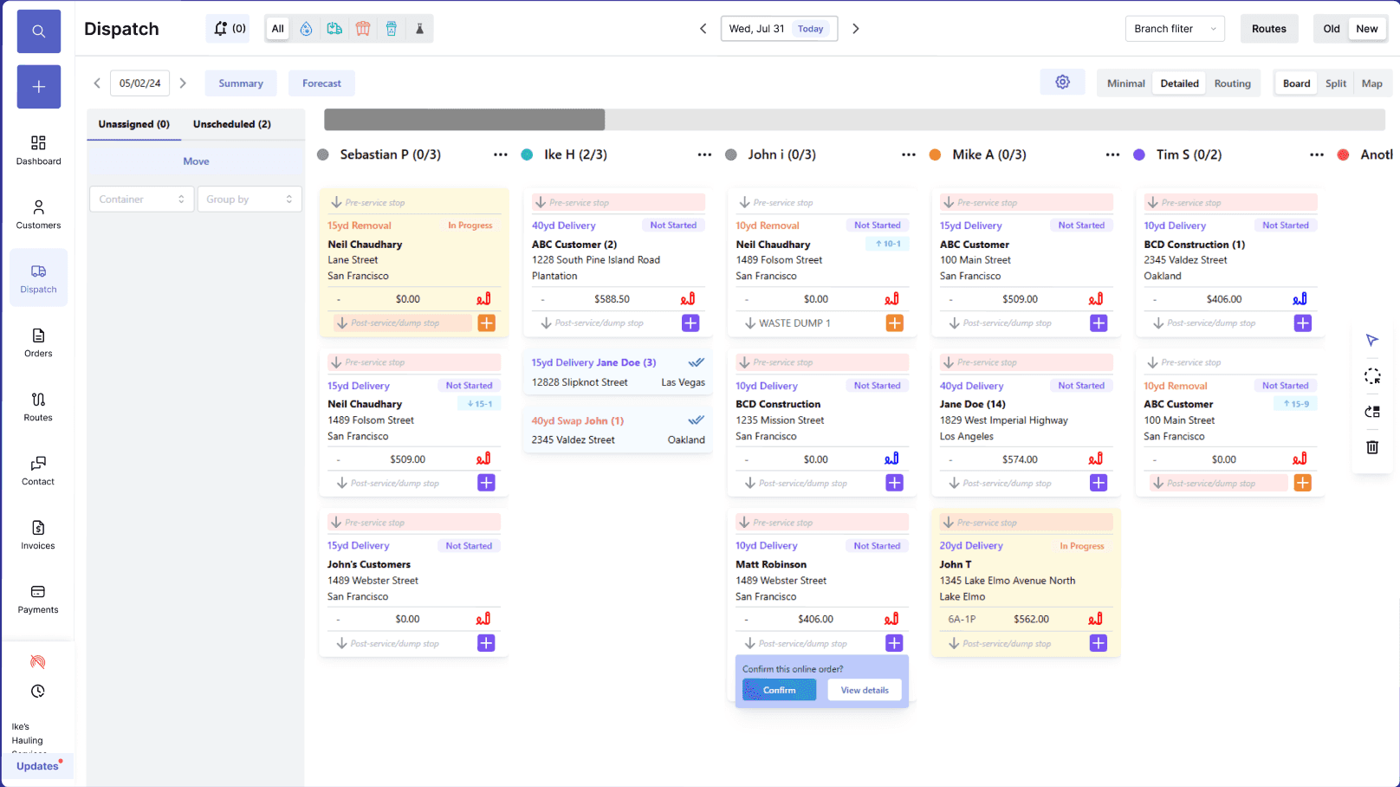
Hauler dispatch software has to do more than place jobs on a calendar. Dispatchers need to see route capacity, driver status, truck assignments, customer account context, site notes, service windows, exceptions, photos, and what each completed job means for billing. TrashLab connects the dispatch board to the driver app, CRM, routing, container tracking, and billing so same-day changes do not turn into lost work or missed revenue.
Operating pain
Dispatch breaks when the board is not connected
A dispatch board is only useful if it knows what the customer ordered, what the driver completed, what changed in the field, and what billing needs next. If dispatch is disconnected from CRM, route planning, the driver app, and invoices, every same-day change creates a follow-up task someone has to remember.
Dispatchers rebuild routes from calls, sticky notes, texts, and incomplete work orders.
Drivers do not have the latest service notes, gate codes, or customer-specific instructions.
Customer service has to interrupt dispatch to answer status questions.
Completed stops, blocked access, and disposal notes do not reach billing cleanly.
New dispatchers take too long to ramp because workflow knowledge lives in one person's head.
Route changes create billing gaps when added work never becomes an invoice line.
What to look for
Dispatch capabilities haulers should expect
Competitor dispatch pages emphasize drag-and-drop work, routing, driver visibility, and same-day updates. TrashLab goes further by connecting dispatch to the customer and billing record.
Live dispatch board
View jobs by route, driver, truck, service type, priority, and status. Reassign work quickly when customers call or the day changes.
Route and driver context
Show service windows, site notes, account flags, truck constraints, disposal timing, and driver assignments before the work leaves dispatch.
Driver app updates
Send work to drivers and receive completion status, photos, timestamps, exception reasons, and notes from the field.
Customer-service visibility
Let CSRs answer pickup, ETA, and issue questions from the customer record without calling dispatch.
Billing handoff
Turn completed work and dispatch exceptions into invoice-ready records with proof attached.
Route performance reporting
Measure missed stops, route completion, driver productivity, same-day changes, billable exceptions, and service quality over time.
Workflow
How connected dispatch works
Good dispatch software manages the entire loop: plan work, send it to the field, capture what happened, and make billing/reporting smarter.
Plan
Build a dispatch plan with customer, site, container, route, truck, and driver context.
- Filter work by service type, priority, geography, and route
- Assign drivers and trucks with capacity and service windows visible
- Add same-day orders without losing account or pricing context
Execute
Push current instructions to drivers and let dispatch react as the route changes.
- Driver app receives stop sequence, notes, photos, and job details
- Dispatch sees completion, blocked access, skipped work, and route status
- Customer service sees the same status without opening a separate tool
Close the loop
Use dispatch data for billing, customer communication, and management reporting.
- Send billable exceptions to invoice review
- Attach proof of service to customer history
- Report on missed stops, route efficiency, and same-day change volume
Checklist
Hauler dispatch software checklist
Use this when evaluating dispatch tools for waste, trash, roll-off, residential, or commercial hauling.
Supports recurring routes, one-off jobs, roll-off swaps, pickups, deliveries, and removals.
Connects dispatch to customer records, site notes, container records, driver app, and billing.
Captures proof of service, photos, timestamps, skipped stops, and exception reasons.
Shows live route status to customer service without dispatcher interruption.
Handles same-day changes, reassignment, and over-scheduled trucks clearly.
Reports on route completion, missed stops, productivity, and billable exceptions.
Works at hauler-scale with fast filters rather than loading every job into the browser.
Supports role-based access for dispatchers, CSRs, drivers, and managers.
Next steps
Related dispatch resources
Waste dispatch software
Broader dispatch capabilities for waste operations.
Garbage route planner
Route planning and optimization for collection work.
Waste driver app
Driver workflow, proof of service, and field updates.
Waste management software
The full operating platform across dispatch, billing, and CRM.
Waste dispatch software
Dispatch board, route status, driver app, and same-day changes.
Waste billing software
Recurring billing, exception charges, payments, and AR.
Waste hauler CRM
Customer accounts, service sites, quotes, and communication history.
FAQ
Questions haulers ask
What is dispatch software for haulers?+-
Dispatch software for haulers is a system for planning and managing daily hauling work across routes, drivers, trucks, customers, and service types. It should connect to the driver app, customer records, billing, and reporting so work does not disappear after it leaves the board.
Can dispatch software handle roll-off and recurring routes together?+-
Yes. TrashLab supports recurring collection routes and roll-off work such as deliveries, swaps, pickups, removals, and relocations in the same operating system.
How does dispatch software help billing?+-
Completed work, missed stops, blocked access, contamination, extra pickups, and disposal notes can flow from dispatch and the driver app into invoice review. That reduces missed charges and customer disputes.
Does dispatch software replace route planning?+-
It should include route planning or integrate tightly with it. Dispatch decides what work happens today; route planning decides the best sequence and field execution path.
Can CSRs see dispatch status?+-
Yes. TrashLab exposes service status, route context, driver proof, and exception notes from the customer record so customer service can answer questions without interrupting dispatch.
TrashLab
See how the workflow fits your hauling operation
Bring real dispatch, billing, route, driver, and container examples. We will walk through how they work in TrashLab.
Talk to sales: (720) 262-2079