
Waste route software
Waste route software that connects planning to the field
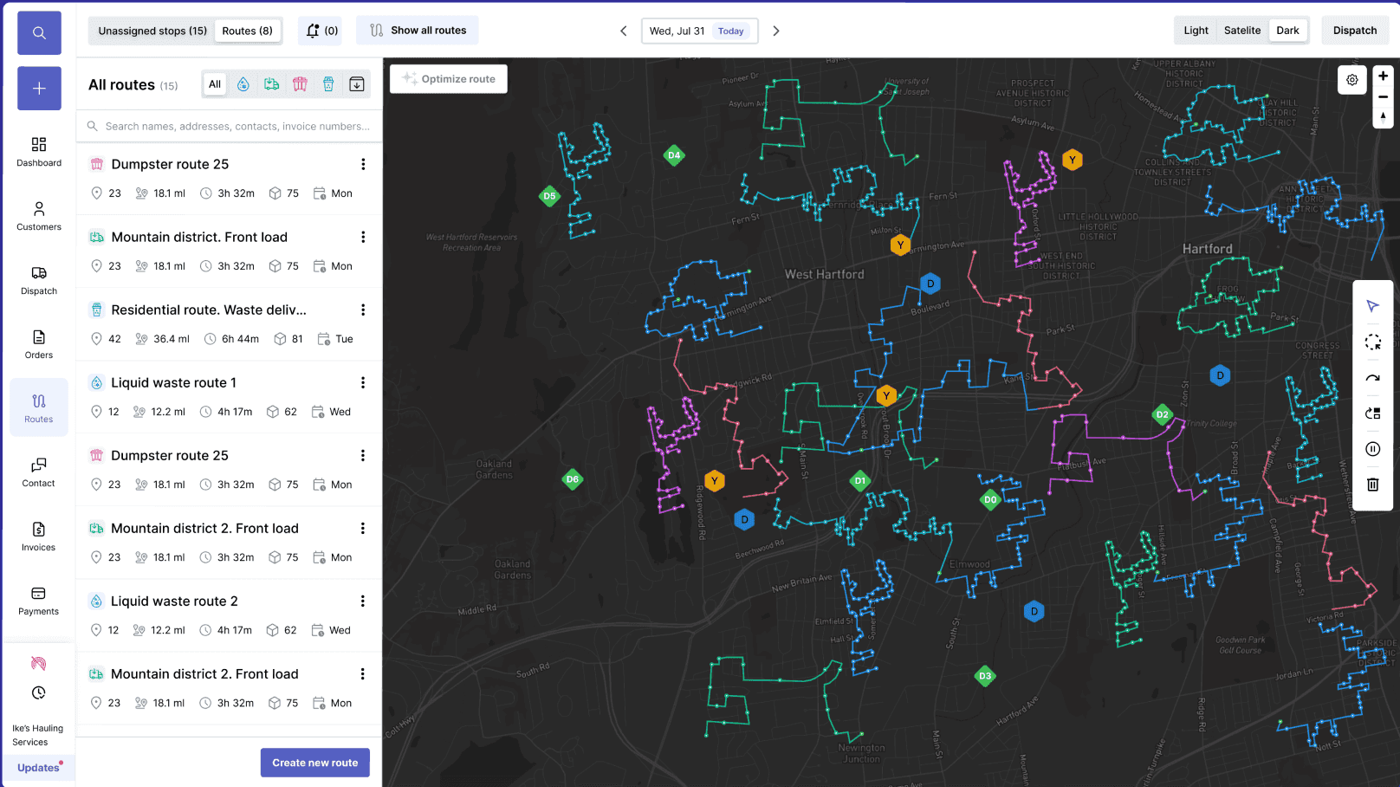
Waste route software has to manage more than a stop sequence. Haulers need recurring route templates, same-day dispatch changes, driver instructions, service-window context, disposal timing, missed pickup handling, proof of service, customer visibility, and billing closeout. TrashLab keeps route planning, dispatch, driver execution, customer service, and revenue capture connected around the same route record.
Operating pain
Route sheets are not enough once the day starts changing
Static route sheets and map exports break down when new work appears, a driver gets behind, a site is blocked, disposal timing changes, or a customer calls about route status. Waste route software should keep the live plan, field execution, customer service, and billing closeout in sync.
Recurring routes drift because account, frequency, and service-window changes are not reflected everywhere.
Dispatchers have to call drivers for status instead of seeing progress in the route record.
Drivers complete or skip stops without structured proof that customer service and billing can use.
Missed pickups become customer calls before the office can reroute, notify, or document the issue.
Route exceptions do not flow into billing, so extra service and avoidable costs get missed.
Route history is hard to analyze because planned work and actual work live in different places.
What to look for
Waste route software capabilities
Effective waste route software supports planning, execution, exception management, and closeout reporting for the same route.
Recurring route templates
Build route structures around service frequency, geography, equipment, customer priority, service windows, and disposal timing.
Daily route planning
Adjust daily route work around new orders, cancellations, capacity, truck availability, and route density.
Dispatch connection
Move planned routes onto the dispatch board with driver, truck, customer, site, and service context attached.
Driver app execution
Give drivers the stop order, site instructions, customer notes, navigation context, and completion workflow.
Missed pickup tracking
Capture blocked access, skipped stops, late stops, customer-not-home issues, contamination, and service exceptions.
Route closeout
Compare planned versus actual route outcomes and feed completed work, extras, and proof into billing review.
Workflow
How waste routes should move through the system
TrashLab keeps route planning, dispatch execution, driver proof, and billing closeout tied together.
Plan the route
Build route work from recurring templates, live jobs, customer changes, and operating constraints.
- Group stops by service type, geography, frequency, and priority
- Consider truck capacity, disposal timing, service windows, and account notes
- Prepare routes for dispatch and driver execution, not just map review
Run the route
Keep dispatchers, drivers, and CSRs aligned as routes are completed or changed.
- Push stop order, instructions, and status workflows to drivers
- Track completion, missed pickups, blocked access, and photos
- Handle same-day reassignment without losing route context
Close the route
Use actual field outcomes to improve billing, reporting, and future route planning.
- Review completed work, exceptions, disposal, and proof of service
- Move billable events into invoice review
- Report on plan versus actual route performance and route profitability
Checklist
Waste route software checklist
Use this checklist when evaluating route software for waste collection, trash hauling, or garbage routes.
Supports recurring routes, same-day jobs, one-off work, missed pickups, and route exceptions.
Connects route planning to dispatch, driver app execution, customer history, billing, and reporting.
Handles service windows, truck capacity, disposal timing, site notes, and customer-specific instructions.
Captures proof of service, photos, timestamps, blocked access, contamination, and missed-stop reasons.
Shows live route status to dispatchers, CSRs, and managers without requiring driver calls.
Reports on planned versus actual route outcomes, route profitability, and recurring route changes.
Uses backend filtering and fast map/list views for large stop and route histories.
Supports implementation from existing route sheets, customer files, or legacy route software.
Next steps
Related waste route pages
Route management software
Route management for dispatch, drivers, customers, and billing.
Waste route optimization software
Automated route planning and route profitability workflows.
Garbage truck routing software
Routing software for garbage trucks connected to dispatch and billing.
Garbage route planner
Educational route planning guide for hauling operations.
Waste dispatch software
Dispatch board, same-day changes, driver app status, and proof.
Waste hauler software
The complete operating system for haulers.
Dumpster rental software
Roll-off workflows for containers, jobs, drivers, and billing.
ROI calculator
Estimate savings from better dispatch, routing, and billing.
FAQ
Questions haulers ask
What is waste route software?+-
Waste route software helps haulers plan, assign, execute, monitor, and improve collection routes. It should connect route planning to dispatch, driver app status, proof of service, missed pickups, customer history, and billing.
Is waste route software the same as route optimization?+-
Not exactly. Route optimization focuses on improving route sequences and efficiency. Waste route software should also handle route templates, dispatch execution, driver proof, missed pickups, customer visibility, and billing closeout.
Can TrashLab handle recurring residential routes?+-
Yes. TrashLab supports recurring residential and commercial routes, along with roll-off, frontload, rearload, portable toilet, and mixed hauling workflows.
Can drivers capture route proof in TrashLab?+-
Yes. Drivers can capture photos, timestamps, completion status, blocked access, contamination, missed-stop reasons, and notes from the field.
Does route software help billing?+-
Yes. When route exceptions, extras, completed stops, disposal details, and proof flow into invoice review, billing teams can capture more revenue with fewer disputes.
TrashLab
See how the workflow fits your hauling operation
Bring real dispatch, billing, route, driver, and container examples. We will walk through how they work in TrashLab.
Talk to sales: (720) 262-2079