
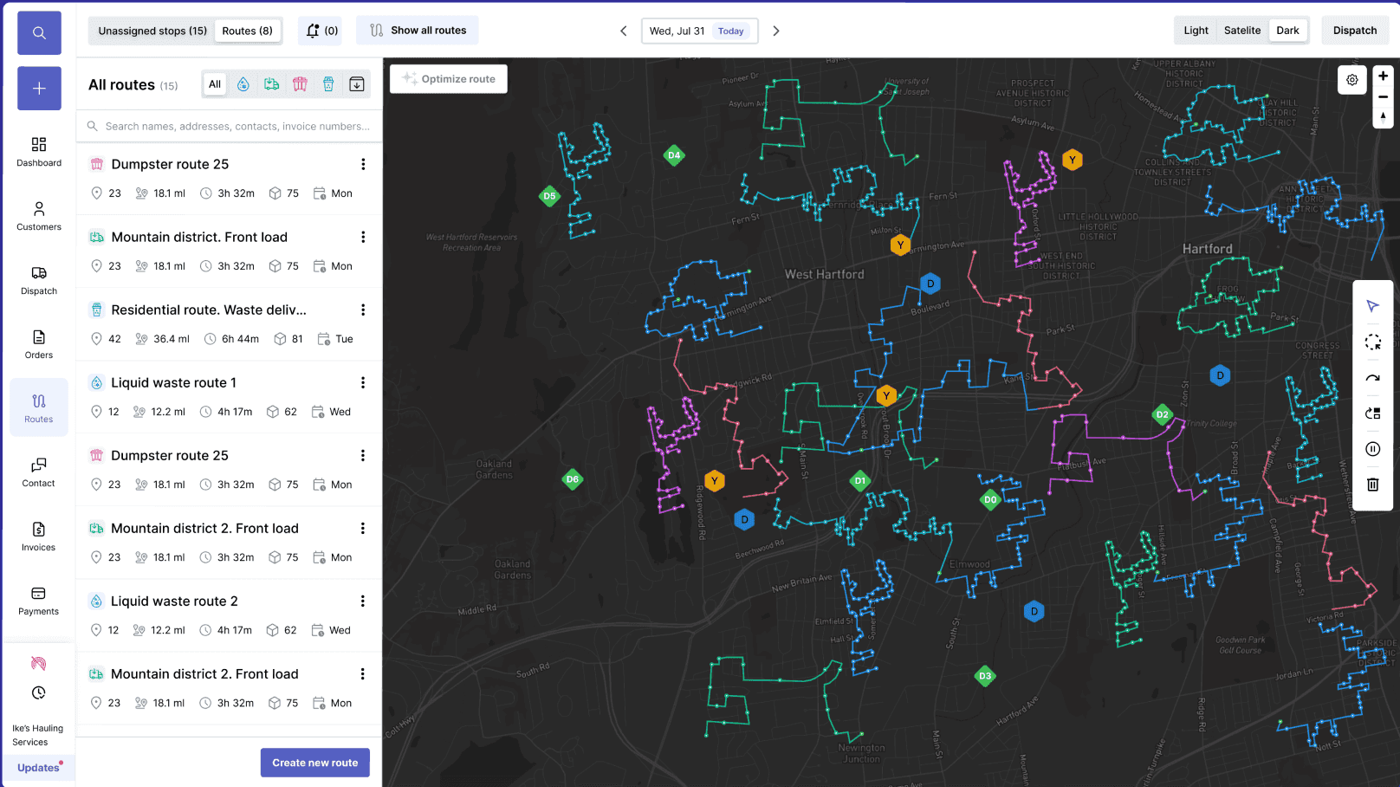
Garbage truck routing software
Garbage truck routing software connected to dispatch, drivers, and billing
Garbage truck routing software should do more than draw a better line on a map. Haulers need routes that respect service windows, truck capacity, customer notes, route density, driver execution, missed stops, proof of service, and billing impact. TrashLab connects routing with dispatch, the driver app, customer records, and invoice capture so route plans survive the real service day.
Operating pain
Routing alone does not solve the service day
Route optimization can reduce miles, but haulers also need dispatchers, drivers, CSRs, and billing teams to see what changed, what was completed, what failed, and what should be charged. A route that is not connected to operations becomes another plan the office has to reconcile.
Route plans ignore customer notes, service windows, truck constraints, and account flags.
Dispatch cannot adjust routes cleanly when same-day calls, missed stops, or truck issues happen.
Drivers do not capture structured proof or exception reasons that billing can use.
Customer service cannot answer route status questions without calling dispatch.
Route performance reports do not connect to revenue, missed charges, or customer complaints.
Large route histories become slow when maps load too much data client-side.
What to look for
Routing capabilities garbage haulers need
Routing software should help plan better routes and keep the rest of the operation aligned when the route changes.
Route planning
Plan route sequences with geography, density, service windows, truck constraints, disposal timing, and local driver knowledge.
Dispatch connection
Move planned routes onto the dispatch board with driver, truck, customer, and service context attached.
Driver app execution
Send stop order, notes, and instructions to drivers while capturing completion status and exceptions.
Proof of service
Capture photos, timestamps, skipped stops, blocked access, contamination, and service notes.
Customer-service visibility
Show route status, service history, and exception notes from the customer record.
Route reporting
Report on completion, missed stops, productivity, billable exceptions, route profitability, and service quality.
Workflow
How connected garbage truck routing works
TrashLab keeps route planning, dispatch execution, customer service, and billing aligned around the same route record.
Plan the route
Use route and customer context to build a practical service plan.
- Segment routes by service type, geography, priority, and frequency
- Consider customer notes, service windows, truck constraints, and disposal timing
- Prepare routes for dispatch instead of creating isolated map exports
Run the route
Give drivers and dispatch the same current plan.
- Push stop sequence and route instructions to the driver app
- Capture completion, photos, missed stops, blocked access, and exceptions
- Adjust same-day work while keeping customer service informed
Improve the route
Use field data and billing outcomes to improve future planning.
- Review route completion, missed stops, extra service, and productivity
- Connect route exceptions to invoices and customer history
- Report on profitability, complaints, and recurring route issues
Checklist
Garbage truck routing software checklist
Use this checklist when comparing routing and route optimization tools for waste collection fleets.
Supports recurring residential, commercial, and mixed collection routes.
Connects route plans to dispatch, driver app, customer records, billing, and reporting.
Handles service windows, truck constraints, disposal timing, frequency, and local route knowledge.
Captures proof of service, photos, timestamps, missed stops, and exception reasons.
Shows route status to customer service without dispatcher interruption.
Reports on route completion, driver productivity, missed stops, exceptions, and profitability.
Supports backend filtering and map loading patterns that scale to large route histories.
Keeps route changes auditable so billing and customer history stay accurate.
Next steps
Related routing resources
Garbage route planner
Route planning strategy and optimization workflow.
Waste route optimization software
Route optimization for waste operations.
Waste driver app
Driver execution and proof of service.
Waste management software
The full operating platform across dispatch, billing, and CRM.
Waste dispatch software
Dispatch board, route status, driver app, and same-day changes.
Waste billing software
Recurring billing, exception charges, payments, and AR.
Waste hauler CRM
Customer accounts, service sites, quotes, and communication history.
FAQ
Questions haulers ask
What is garbage truck routing software?+-
Garbage truck routing software helps haulers plan, sequence, dispatch, execute, and improve collection routes. It should connect route planning to dispatch, driver app status, customer history, proof of service, billing, and reporting.
Is routing software the same as dispatch software?+-
No. Routing focuses on the route plan and stop sequence. Dispatch manages the day of work, assignments, same-day changes, status, and field execution. Haulers usually need both connected.
Can TrashLab support residential and commercial routes?+-
Yes. TrashLab supports residential, commercial, roll-off, and mixed waste routing and dispatch workflows.
Can drivers capture missed stops and proof?+-
Yes. Drivers can capture completion status, photos, timestamps, missed stops, blocked access, contamination, and service notes.
Does routing connect to billing?+-
Yes. Route exceptions, extra service, missed stops, and proof of service can flow into customer history and invoice review.
TrashLab
See how the workflow fits your hauling operation
Bring real dispatch, billing, route, driver, and container examples. We will walk through how they work in TrashLab.
Talk to sales: (720) 262-2079